Digital signing is now a standard way for organizations to move faster in the modern business environment. It reduces paperwork and also supports remote work. Documents like contracts, approvals, HR files, and more are signed online every day. But there is one critical issue many overlook: a signature alone is not sufficient proof.
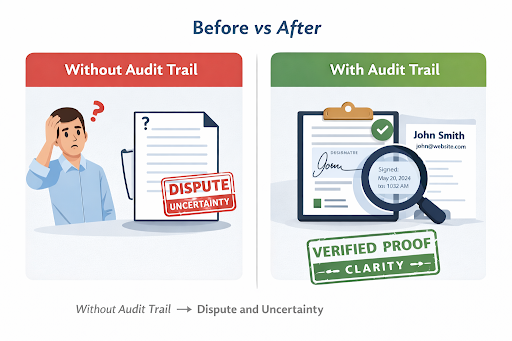
Imagine sending an important contract to a client or signing a high-value approval internally, only to have the signer later deny they ever signed it, or even claim the document was altered. Suddenly, what was meant to speed up business becomes a major risk.
When such disputes arise, or an internal investigation begins, the organization has to answer more than just “Is there a signature?” You must prove who signed, when they signed, how they were verified, and whether the document was altered or tampered with. Without this proof, digital signing stops being an advantage or a trust mechanism and becomes a liability.
In this article, we explain what an audit trail is, why it matters for compliance and security, and how it works in real digital signing workflows. We also cover how modern digital signing platforms support audit-ready signing in practice.
What Is an E-Signature Audit Trail?
An e-signature audit trail functions as a detailed record of everything that happens to a digital document. It automatically records who did what, when they did it, and how the whole process unfolded from start to finish.
In simple terms, the visible signature is only the surface. The audit trail is the invisible proof behind it.
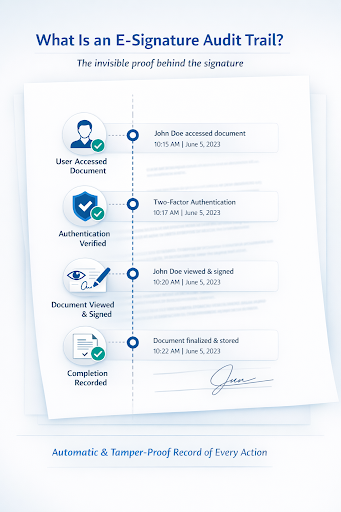
An audit trail typically records:
- Who interacted with the document
- When each action occurred
- How the signer was authenticated
- What actions were taken, such as viewing, signing, or commenting
An audit trail is very different from a manual log or a screenshot. It is automatically generated by the system. If someone tries to change the document,it is flagged as invalid; edits are not possible without being detected. You also have a record of that detection, which makes the audit trail reliable and trustworthy. For organizations handling sensitive or regulated data, this record is often more important than the signature itself.
Why Audit Trails Matter for Digital Signing Compliance
Audit trails are essential for modern organizations. They are a core requirement for compliance, security, and governance.
If you look at this from a regulatory point of view, many laws require organizations to keep reliable records of who did what. Rules like eIDAS, ESIGN, and UETA focus on three key things:
- Identity
- Intent
- Integrity
An audit trail helps cover all of these.
An audit trail for e-signatures helps reduce disputes and proves compliance. When there are many systems and users, it becomes unrealistic to track activity manually.
What Information Is Included in an E-Signature Audit Trail?
A strong audit trail captures clear, non-technical information that tells the full story of a signing event.
Common elements include:
- Signer identity and authentication method
- Date and time stamps for every action
- Delivery method, such as email, SMS, or secure link
- IP or device context (at a high-level, for traceability)
- Signing order and completion status
- Final document integrity confirmation
This information matters because it shows:
- Intent – the signer knowingly took action
- Sequence – events happened in a clear order
- Integrity – the document remained unchanged after signing
Together, these elements turn a digital signature into verifiable evidence.
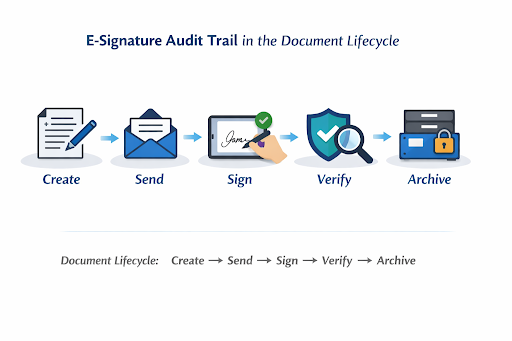
How Audit Trails Are Created in Real Digital Signing Workflows (With WeSign)
Step 1: Document Preparation
Documents are uploaded individually or in batches. Templates can be used for consistency, and notes can be added before sending.
Audit trail value:
The system records document origin, creator, and preparation time.
Step 2: Secure Signature Request
Documents are sent via email, SMS, or secure link. A signing order can be defined for one or multiple signers.
Audit trail value:
Delivery method, recipient identity, and timing are logged.
Step 3: Signer Authentication
Authentication methods may include two-step verification, smart cards or tokens, face recognition where enabled, or SSO via Active Directory or Azure AD.
Audit trail value:
Strong proof of signer identity and consent is recorded.
Step 4: Signature Execution
Signers complete the document using drawing, a graphic signature, or initials. Comments can be added, and optional video sessions may support remote signing.
Audit trail value:
Exact signing time, method used, and signer interactions are captured.
Step 5: Secure Completion and Storage
Signed documents are encrypted, stored securely in the cloud, and protected with trusted digital certificates under frameworks such as eIDAS.
Audit trail value:
A tamper-resistant, verifiable final record is preserved.
How Organizations Ensure Audit Trail Integrity
Ensuring audit trail integrity requires more than basic logging. Organizations typically rely on best practices such as:
- Automated event logging with no manual edits
- Encryption of documents and logs
- Trusted timestamps and digital certificates
- Role-based access control
- Centralized, secure cloud storage
- Regular internal reviews
Implementing Audit-Ready Digital Signing
Audit trails are a core requirement. They must be built into digital signing solutions, not added later as an afterthought.
When evaluating digital signing tools, organizations should ensure they:
- Fit existing workflows
- Support compliance requirements
- Remain easy for users
Modern platforms demonstrate how audit trail support can be embedded into everyday business processes, helping organizations move faster without sacrificing trust or accountability.
Contact us and explore secure digital signing solutions that include audit trails by design.
FAQs:
What Is an E-Signature Audit Trail?
An e-signature audit trail is the story behind the signature. It automatically records who touched the document, when they did it, and how the signing actually happened. The signature may be visible, but the audit trail is the proof that gives it meaning.
Why Does an Audit Trail Matter for Compliance?
Because trust is not enough. Laws like eIDAS, ESIGN, and UETA expect organizations to prove identity, intent, and integrity. An audit trail gives you that proof — so when questions come, you have clear answers instead of uncertainty.
What Does an E-Signature Audit Trail Record?
It captures the essentials: who signed, how they were verified, when each step happened, and whether the document stayed unchanged. Simple details that make a big difference when something is challenged.
Can an Audit Trail Be Used as Legal Evidence?
Yes. When a signature is questioned, the audit trail speaks for you. It shows what happened, step by step, and helps turn doubt into clarity.
How Do Organizations Protect Audit Trail Integrity?
Organizations protect audit trail integrity by using proper systems, not manual tracking. The system records every action automatically and does not allow edits or changes. This is especially important when many users are involved, because manual logs can lead to errors, missing records, or tampering.